
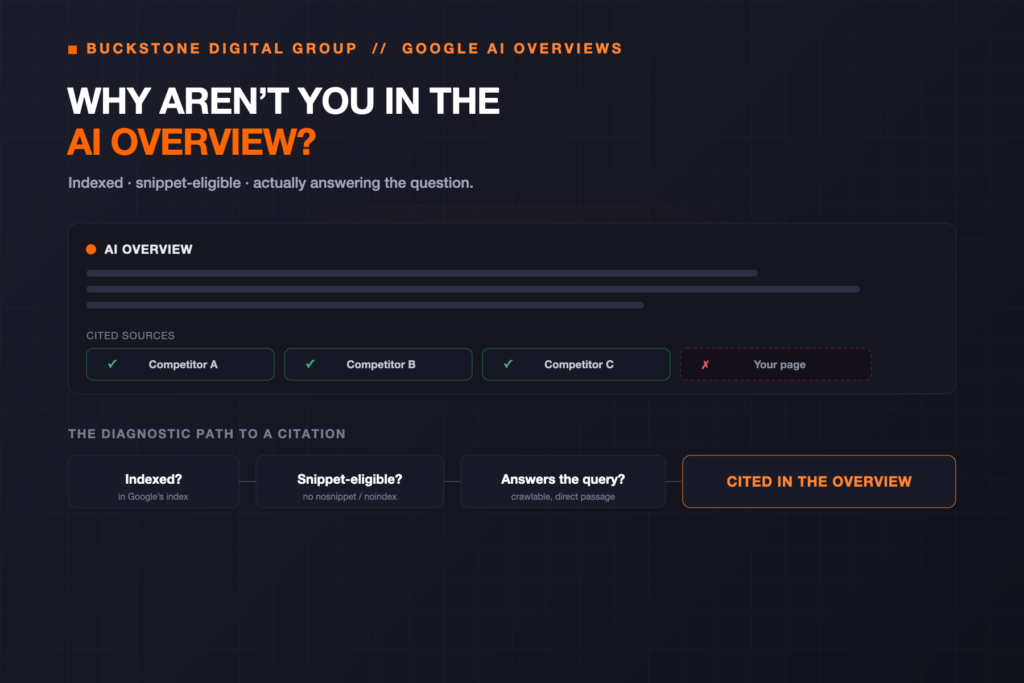
You search a question your business should obviously answer, and Google builds an AI Overview at the top of the page — a summarized answer with a handful of cited links off to the side. Your competitors are in there. You’re not. The question writes itself: “Why isn’t my business showing up in Google’s AI Overviews?”
The honest answer is that “showing up in an AI Overview” isn’t one thing, and being absent isn’t one problem. It can mean the query never generated an AI Overview at all, that your page isn’t eligible to be shown, that Google can’t read the part of your page that answers the question, or that a competitor’s page was simply a better-matched source. Each of those has a different fix — so the useful work is diagnosis, not guessing.
Google is explicit that there’s no special markup, file, or schema that puts you in an AI Overview. Eligibility comes from the same place as normal search: being indexed, being allowed to show a snippet, and actually answering the question. If you’re missing, the cause is almost always one of those three — or the query simply didn’t trigger an Overview.
- AI Overviews don’t appear for every query — sometimes there’s nothing to be absent from.
- Eligibility equals normal search eligibility: indexed and able to be shown with a snippet.
- There is no special schema, file, or markup that gets a page into an AI Overview.
- Preview controls —
noindex,nosnippet,data-nosnippet,max-snippet— can quietly exclude you. - There is no AI-Overviews-only opt-out; the same controls that limit snippets limit AI features.
- Selection uses query fan-out — Google answers sub-questions, so passage-level relevance matters more than a single ranking.
- If Google can’t read the answer (JavaScript-only, text-in-images, PDFs), it can’t cite it.
- You may already be appearing — Search Console folds AI features into the overall “Web” performance, with no separate click breakdown.
- Appearing isn’t guaranteed or permanent; AI Overviews vary by query, user, and time.
What “showing up in an AI Overview” actually means
An AI Overview is the AI-generated answer Google sometimes places at the top of the results page, alongside a small set of cited supporting links. “Showing up” usually means one of two things: your page is one of the cited supporting links, or your business is named in the generated text. Those aren’t the same, and neither is identical to ranking #1 in the classic blue links below.
An AI Overview is a summarized answer shown on a normal Google results page. AI Mode is a separate, fully conversational Google search experience. The classic results are the ranked links. A page can appear in one and not the others — so “we rank #1 but aren’t in the Overview” is common, not contradictory.
This article is about the diagnostic question — why you’re not there. If you want the proactive playbook, see how to appear in Google AI Overviews; for the conversational surface, how to show up in Google AI Mode.
How Google decides what goes into an AI Overview
Google’s public guidance is unusually direct here. To be eligible as a supporting link in AI Overviews or AI Mode, a page needs to be indexed and eligible to be shown in Google Search with a snippet — and, in Google’s words, “There are no additional technical requirements.” There is no AI-specific markup and, again in Google’s words, “no special schema.org structured data that you need to add.”
What’s different is selection. AI Overviews use a query fan-out: Google breaks your question into related sub-questions, runs them in the background, and assembles one answer from many results — which is why a page can be cited for a question it never explicitly targeted, and why passage-level relevance often matters more than a page’s overall ranking.
First, does this query even show an AI Overview?
Before assuming you’ve been excluded, confirm there’s something to be excluded from. AI Overviews don’t appear for every search. They’re more likely on informational, exploratory, and multi-part questions, and less likely on simple navigational or purely branded lookups — and Google is more cautious on some sensitive or “your money or your life” topics. AI Overviews are also not deterministic: the same query can show one for one user and not another, or change over time.
So test the specific queries that matter to your business, from a clean session, and note which actually generate an Overview. If a query doesn’t trigger one at all, “not showing up” isn’t a visibility failure — there’s simply no Overview on that search.
The real reasons your business isn’t showing up
When an AI Overview does appear and you’re not in it, the cause is almost always one of the following. They run roughly from “most mechanical” to “most strategic.”
1. The query never triggered an Overview
Covered above, but it’s the first thing to rule out. No Overview means nothing to appear in — and it’s the most common false alarm.
2. Your page isn’t indexed
If a page isn’t in Google’s index, it can’t be a supporting link — full stop. Check the exact URL in Search Console’s URL Inspection tool. Common culprits: a stray noindex, a blocked path in robots.txt, canonicalization pointing elsewhere, or a page Google simply hasn’t crawled yet. This is the single most common technical reason for total absence.
3. It’s indexed but not snippet-eligible
Eligibility requires being showable with a snippet. If a page carries nosnippet, data-nosnippet around the key content, or max-snippet set very low, you can rank normally yet be ineligible for AI features. These directives are easy to inherit from a theme, plugin, or old SEO configuration without realizing it.
4. Google can’t read the part that answers the question
AI Overviews draw on text Google can actually crawl and render. If the answer lives only in JavaScript that doesn’t render server-side, inside an image or infographic, in a PDF, or behind a tab/accordion that never loads into the DOM, it may be invisible for this purpose. Make the substantive answer available as real, crawlable text (is your website blocking crawlers? and technical SEO for AI search).
5. Nothing on your site directly answers the fanned-out question
Because selection is passage-level, a page that’s “about” the topic in general may still not contain a clean, direct answer to the specific sub-question Google is resolving. Pages that state the question and answer it plainly — in the first sentence of a section, not buried three paragraphs down — are easier to lift into an Overview.
6. A competitor’s page is a better-matched source
Sometimes you’re fully eligible and simply weren’t chosen, because another page answered the sub-question more directly or carried stronger supporting signals. That’s a relevance-and-evidence gap, not a technical one — the same dynamic behind why an assistant recommends your competitors, applied to Google.
7. Google isn’t sure which business you are
If your entity is ambiguous — inconsistent name, thin About page, weak or conflicting structured data, a similar-named competitor — Google may struggle to connect a query about “your” kind of business to your pages with confidence. Reducing that ambiguity is the work of entity SEO and helping AI systems understand your business.
8. The page is too new, or was just changed
A newly published or recently edited page has to be crawled and re-indexed before it can be selected. If you just fixed a noindex or rewrote the answer, request indexing in Search Console and give it time — eligibility changes aren’t instant.
9. You’re actually appearing — you just can’t tell
Because AI Overviews vary by user and session, your own spot-checks can miss appearances that real users see. And Search Console doesn’t isolate AI Overview clicks. So “I never see us” isn’t proof of absence — it may be a measurement gap, covered below.
The preview controls that quietly exclude you
This deserves its own section because it’s the most overlooked cause. Google uses the same preview controls for AI features that it uses for search snippets. If a page limits its snippet, it limits its AI-feature eligibility at the same time.
The controls to check: noindex (removes the page entirely), nosnippet (no text snippet, which also makes it ineligible as an AI supporting link), data-nosnippet (excludes specific on-page passages), and max-snippet (caps snippet length; set to 0, it behaves like nosnippet). Crawling itself is governed by robots.txt for Googlebot.
Because AI is built into Search, the controls that limit AI features are the same ones that limit ordinary snippets. Applying nosnippet to stay out of AI Overviews also strips your normal search snippet — there is no AI-Overviews-only opt-out. Treat these directives as visibility-wide, not AI-specific.
A step-by-step diagnostic
Work the technical checks first — they’re binary and quick — then the content and relevance checks.
- Confirm an Overview exists for the exact query, from a clean session
- URL Inspection — is the answering page indexed and eligible?
- Check for
noindex/nosnippet/ lowmax-snippetin the page head and headers - Scan for
data-nosnippetwrapping the key answer, androbots.txtblocks - Render check — does the answer text exist without JavaScript, and not only inside an image or PDF?
- Direct answer — does a page state and answer the exact sub-question, near the top of a section?
- Passage clarity — is the answer liftable in one or two self-contained sentences?
- Entity clarity — consistent name, About page, and structured data that matches visible text?
- Competitor read — which pages are cited, and what do they answer that you don’t?
- Freshness — recently changed? Request indexing and re-test after re-crawl
Symptom → likely cause → first fix
A quick triage table. (Illustrative mapping — your situation may combine several rows.)
| Symptom | Likely cause | Where to check | First fix |
|---|---|---|---|
| No Overview appears at all | Query doesn’t trigger one | Live search, clean session | Target queries that do; nothing to fix technically |
| Page missing everywhere | Not indexed | URL Inspection | Remove noindex/robots block; request indexing |
| Ranks, but never cited | Not snippet-eligible | Head/headers, data-nosnippet | Remove nosnippet; raise max-snippet |
| Answer is in an image/PDF/JS | Not readable as text | View rendered/source HTML | Add real crawlable answer text |
| Eligible but not chosen | Weak passage relevance | Compare to cited pages | Add a direct, liftable answer |
| Confused with another brand | Entity ambiguity | About page, schema, name use | Strengthen entity clarity |
| Just fixed it, still absent | Not re-crawled yet | URL Inspection, dates | Request indexing; re-test later |
The five layers behind AI Overview visibility
Every reason above maps to one of five layers. Absence is almost always a break in one of them — fix the layer, not the symptom.
- 1Access
Can Googlebot crawl, render, and index the page?
- 2Understanding
Is the entity and the answer unambiguous?
- 3Evidence
Does a passage directly answer the sub-question?
- 4Corroboration
Do outside sources reinforce that you’re a credible answer?
- 5Measurement
Can you tell whether you’re appearing over time?
Improving your odds of being cited
You can’t force your way into an AI Overview, but you can remove every reason to be excluded and give Google a passage worth lifting. In short: keep the answering page indexable and snippet-eligible; put a direct, self-contained answer near the top of the relevant section; make the substantive content crawlable text, not image or script; strengthen entity clarity so Google is confident who you are; and earn the third-party corroboration that separates a credible source from a merely eligible one. Generic, interchangeable pages struggle here — which is why generic content fails in AI search. The full proactive playbook is in how to appear in Google AI Overviews and what makes a business recommendable.
How to tell if you’re actually appearing
This is where a lot of “we’re invisible” conclusions come from thin evidence. AI Overviews vary by user and moment, so eyeballing a few searches is unreliable. In Search Console, AI-feature activity is folded into the overall Performance report’s “Web” search type — there is no separate click-through breakdown that isolates AI Overviews, and Google’s newer generative-AI reporting surfaces impressions rather than a distinct AI-Overview click metric. Practically, that means monitoring is done by testing repeatable query families over time and watching impression and engagement patterns, not by finding a single “AI Overview clicks” number. The mechanics are in how to measure AI Search Visibility and AI rank tracking vs. Google rank tracking.
How this differs from AI Mode, ChatGPT, and Perplexity
Being cited in a Google AI Overview says little about the other surfaces. AI Mode is Google’s separate conversational experience with its own behavior (showing up in AI Mode). ChatGPT and Perplexity use their own crawlers, indexes, and retrieval, so absence there is a different investigation — see why your business isn’t appearing in AI search results for the cross-platform view, and how citations work in Perplexity. The underlying principles rhyme — be accessible, understandable, evidenced, and corroborated — but each platform needs its own check.
When to get help
If you’ve confirmed the query shows an Overview, your page is indexed and snippet-eligible, the answer is crawlable text, and you’re still not chosen, the remaining work is relevance, entity clarity, and corroboration — the harder, higher-value part. That’s where a focused audit earns its keep: a full AEO audit tests each layer across the queries that matter, and if what you find is that Google has the wrong idea of your business entirely, the fix is correcting the incorrect information at its source. BuckStone doesn’t start by chasing one Overview — we start by finding which layer is breaking, and make your business the easiest, best-evidenced answer to the questions your customers actually ask. The Digital Visibility Brief is built to surface exactly that.
Frequently asked questions
Why isn’t my business showing up in Google AI Overviews?
Usually one of a few reasons: the query didn’t trigger an Overview, your page isn’t indexed or isn’t snippet-eligible, Google can’t read the answering content, or a competitor’s page was a better-matched source. Each has a different fix, so diagnose before acting.
Does every Google search show an AI Overview?
No. AI Overviews appear for some queries and not others, are more common on informational and multi-part questions, and can vary by user and over time. If a query doesn’t generate one, there’s nothing to be absent from.
What makes a page eligible for AI Overviews?
Per Google, a page must be indexed and eligible to be shown in Google Search with a snippet, meeting the standard technical requirements. Google states there are no additional technical requirements and no special schema needed.
Do I need special schema or markup to appear in AI Overviews?
No. Google says you don’t need new machine-readable files or AI-specific markup, and there’s no special schema.org structured data that gets you in. Accurate structured data can still help Google understand your page, but it isn’t a switch.
How do I know if my page is even indexed?
Use the URL Inspection tool in Google Search Console on the exact URL. It tells you whether the page is indexed and eligible to appear, and flags issues like noindex, canonical conflicts, or crawl blocks.
Can a page rank well but still be missing from the AI Overview?
Yes. Overview citation is passage-level and depends on directly answering a fanned-out sub-question, plus snippet eligibility. A page can rank in the classic results yet not be selected as a supporting link.
Does nosnippet affect AI Overviews?
Yes. A page must be eligible to be shown with a snippet to be an AI supporting link, so nosnippet (or max-snippet set to 0) makes it ineligible for AI features as well as removing your normal search snippet.
Is there a way to appear in search but opt out of AI Overviews?
No AI-Overviews-only opt-out exists. The preview controls that limit AI features are the same ones that limit ordinary snippets, so opting out of AI features also affects your standard search appearance.
Could my theme or SEO plugin be blocking me?
It can. A stray noindex, a global nosnippet, a low max-snippet, or data-nosnippet wrapping key content can be inherited from a theme, plugin, or old configuration. Check the page head, HTTP headers, and robots.txt.
Does content inside images or PDFs count?
Not reliably for this purpose. AI Overviews draw on text Google can crawl and render. If the answer lives only in an image, infographic, PDF, or unrendered JavaScript, provide the substantive answer as real, crawlable text as well.
What is query fan-out?
It’s Google’s technique of breaking a question into multiple related sub-questions, running them, and assembling one answer from many results. It means your page can be cited for questions you didn’t explicitly target — and that passage relevance matters.
Why are my competitors in the AI Overview and I’m not?
Often you’re eligible but not chosen: a competitor answered the sub-question more directly or carried stronger supporting signals. Compare the cited pages, then add a clearer, self-contained answer and strengthen corroboration.
How long after fixing a page will I appear?
There’s no fixed timeline. Google has to re-crawl and re-index the page before an eligibility change takes effect, and selection still isn’t guaranteed. Request indexing in Search Console and re-test over the following days and weeks.
Can I request indexing to speed this up?
Yes. After removing a block or improving the answer, use URL Inspection in Search Console to request (re)indexing. It prompts a re-crawl but doesn’t guarantee selection into an AI Overview.
Does structured data help me get into AI Overviews?
It isn’t required and isn’t a trigger, but accurate structured data that matches your visible content helps Google understand the page and your entity. Stale or mismatched schema can hurt rather than help.
Is AI Overview the same as AI Mode?
No. An AI Overview is a summarized answer on a normal results page; AI Mode is a separate, fully conversational Google search experience. A page can appear in one and not the other.
Does appearing in AI Overviews mean I’ll appear in ChatGPT or Perplexity?
Not necessarily. Those platforms use their own crawlers, indexes, and retrieval, so each is a separate investigation. The principles rhyme, but you should check each platform independently.
How can I tell if I’m appearing in AI Overviews at all?
Test repeatable query families over time from clean sessions, and watch Search Console’s overall Performance (Web search type), which includes AI features. There’s no separate AI Overview click metric, so trends matter more than a single number.
Does Search Console show AI Overview clicks separately?
No. AI-feature activity is included in the overall Performance report’s “Web” search type, and Google’s newer generative-AI reporting surfaces impressions rather than a distinct AI-Overview click breakdown.
Do branded searches show an AI Overview?
Often not. Simple navigational or purely branded lookups are less likely to trigger an Overview than informational or multi-part questions. If your test queries are branded, you may be seeing no Overview rather than exclusion.
Could Google be confusing my business with another?
Yes, if your entity is ambiguous — inconsistent name, thin About page, weak structured data, or a similar-named competitor. Entity clarity helps Google confidently connect relevant queries to your pages.
Will more backlinks get me into AI Overviews?
There’s no direct “links equal Overview” rule. Credible third-party corroboration can strengthen your standing as a trusted source, but eligibility and a directly relevant, snippet-eligible passage come first.
Is appearing in an AI Overview permanent?
No. AI Overviews are generated per query and can vary by user and over time, so citation can come and go as content, competitors, and the Overview itself change. Treat it as ongoing, not a one-time win.
Should I block AI features to protect my content?
Understand the trade-off first: the controls that limit AI features also limit ordinary snippets and can reduce normal search visibility. There’s no AI-Overviews-only block, so weigh the visibility cost before applying nosnippet or noindex.
What’s the fastest thing to check first?
Confirm the query actually shows an Overview, then run URL Inspection on the answering page. Those two checks resolve the most common cases — no Overview to appear in, or a page that isn’t indexed or snippet-eligible.
What is an AEO audit, and does it cover this?
An AEO audit evaluates whether search and AI systems can access, understand, verify, and recommend your business across the queries that matter — including AI Overview eligibility and selection. See what an AEO audit includes.
Sources & methodology
This article distinguishes documented platform behavior (how Google publicly describes AI Overviews, AI Mode, indexing and snippet eligibility, preview controls, query fan-out, and Search Console reporting — which changes over time and should be re-verified) from BuckStone methodology (the five-layer framework and diagnostic workflow) and reasonable inference (clearly framed as such). Key points reflect Google Search Central’s documentation at the time of writing, including that a page must be indexed and eligible to be shown with a snippet to be an AI supporting link, that there are “no additional technical requirements” and “no special schema.org structured data that you need to add,” that preview controls (noindex, nosnippet, data-nosnippet, max-snippet) govern AI-feature inclusion with no AI-Overviews-only opt-out, and that AI-feature activity is reported within the overall Performance report’s “Web” search type. AI Overviews are generated per query and vary by user and over time; appearing is neither guaranteed nor permanent. The triage table uses clearly labeled illustrative mappings, not real client data; no companies, queries, results, or AI outputs were fabricated, and nothing here guarantees selection into an AI Overview. Verify current Google documentation before relying on specifics. Primary references: Google Search Central — AI features and your website; Search Console (URL Inspection, Performance report) documentation.